Spreadsheets vs an integrated HR system: when to switch
Five signs your HR has outgrown spreadsheets and separate apps, what one connected, AI-native system fixes, and how to switch without a big project.
By Cova
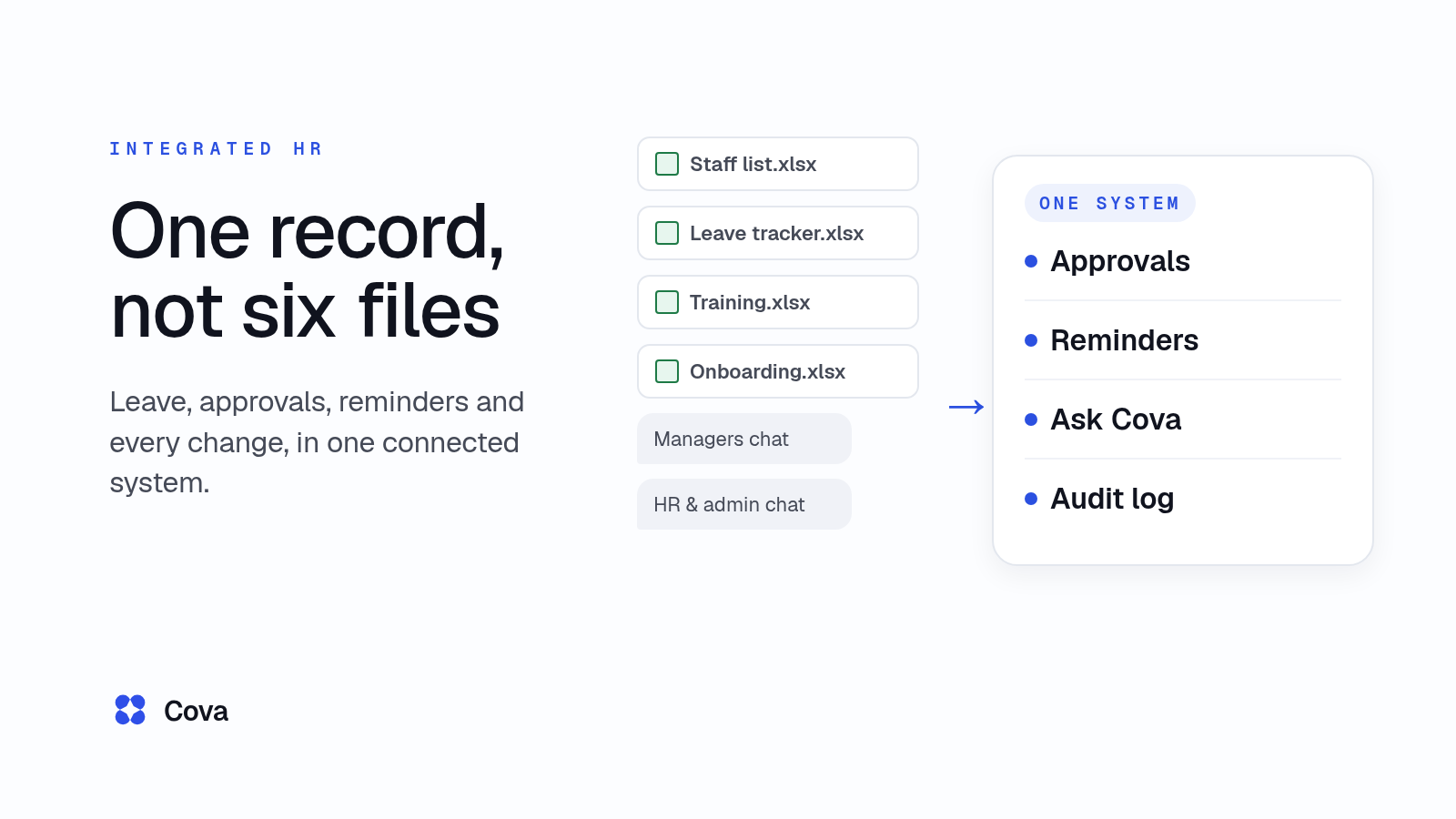
Switch from spreadsheets when the same fact lives in more than one place and someone has to remember to chase it. One connected HR system keeps one record per person, sends reminders by itself and keeps a history of every change, so nobody copies dates between files or scrolls a chat group to find an approval. Cova's HR system works that way, and our team builds and sets it up for yours.
This guide shows the manual way first, a week of HR across spreadsheets and chat groups, then the signs you've outgrown it, what one connected system fixes, and what AI actually does today.
What "integrated" and "AI-native" mean
Integrated means people records, leave, approvals, work pass and certificate dates and training share one set of data. You update a person once, and everything that depends on them uses the new details. With separate tools, you update each one, or they drift apart.
AI-native means the AI works on the same records as everything else, with the same access rules, instead of a chatbot bolted on the side that knows nothing about your people. It helps people look things up by answering questions in plain English. People still make the decisions.
The manual way: one week of HR in spreadsheets
Take a made-up 30-person company. Its HR runs on four spreadsheets and two chat groups:
- Staff list: names, join dates, managers, pass types and expiry dates.
- Leave tracker: staff message their manager, the manager tells HR, HR updates the sheet.
- Training and certificates: courses booked by email, certificate dates typed in by hand.
- Onboarding checklist: copied afresh for each new joiner.
- Two chat groups: one where managers approve things, one for HR and admin.
Here's how a week goes:
- Monday: a supervisor approves leave with a thumbs-up in the managers' group. HR doesn't see it until Wednesday.
- Tuesday: a new joiner's details are typed into the staff list, the leave tracker and a fresh copy of the onboarding checklist.
- Thursday: someone spots a work pass expiring in three weeks, only because they happened to open the staff list.
- Friday: a leave balance in the tracker doesn't match what the manager remembers, and nobody can say who changed it.
A made-up company and week: the people and events are invented, for illustration only.
None of this is anyone's fault. It's what happens when the same facts live in six places and every reminder depends on someone remembering.
Five signs you've outgrown spreadsheets and separate tools
- Copies drift. The same person's details sit in three files, and they no longer agree.
- Approvals get lost in chat. A thumbs-up in a group thread is the only record that leave was approved.
- Expiries are noticed late. Work pass and certificate dates are in a sheet, but nothing tells anyone when one is close.
- Nobody can say who changed what. A balance or a date changes, and finding out who did it, and why, means asking around.
- New joiners mean re-typing. The same name, start date and pass details go into the staff list, the leave tracker and the onboarding checklist.
If two or more sound familiar, it's time to move to one system.
What one connected system fixes
Each fix below shows the manual way, then how Cova does it.
One record per person
The manual way: a staff list in one file, copied into the others.
In Cova: HR adds people one at a time or imports them from Excel or CSV, with a preview; nothing is created or emailed until HR reviews and submits. Leave, approvals, work passes and certificates are then kept against that one record.
One Approvals inbox
The manual way: approvals scattered across chat groups, emails and quick words in the corridor.
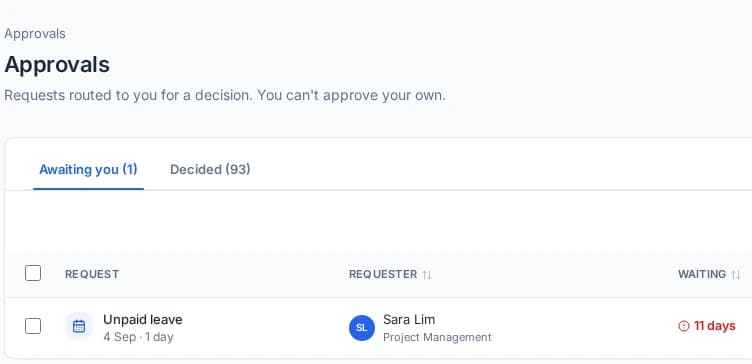
In Cova: leave, training and form requests land in one Approvals inbox, and a request waiting more than 3 days turns red. Our guide to approval workflows for SMEs covers how to set up who approves what.
Reminders that send themselves
The manual way: expiry dates in a sheet, plus a calendar reminder if someone remembered to set one.
In Cova: HR and the direct manager are emailed 90, 60 and 30 days before a work pass or certificate expires, on the expiry date, and 7 days after if it's still expired. Our guide to expiry reminders covers how they work.
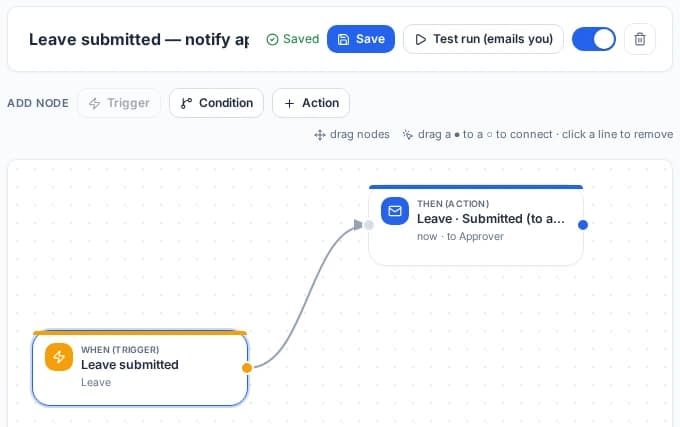
Beyond expiry dates, the automation builder sends an email or training survey when something happens, only if conditions match, straight away, after a wait, or days before or after a date. For example, it can email HR when someone applies for 5 or more days of leave.
A history of every change
The manual way: asking "who changed this?" in the group chat.
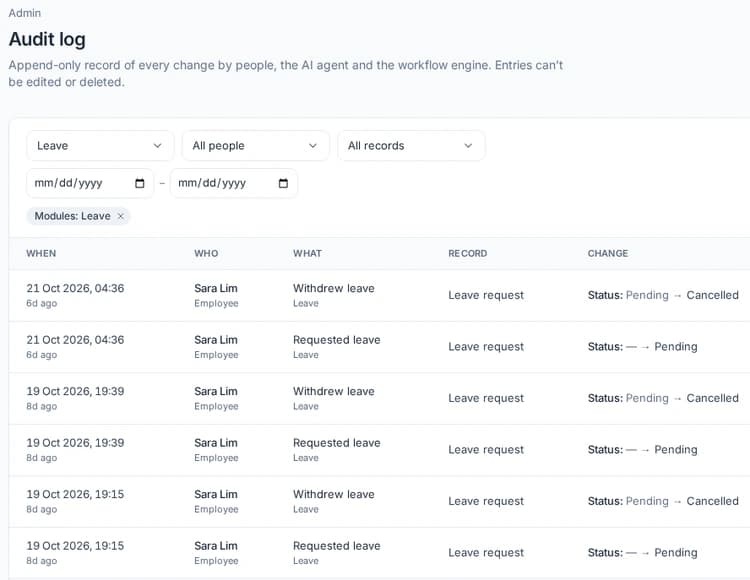
In Cova: the Audit log records every change, by people and by Cova itself, and nobody can edit or delete an entry.
Your own tables when you still want a sheet
The manual way: one more spreadsheet for whatever doesn't fit anywhere else, such as a uniform issue log.
In Cova: Sheets are Cova's own tables: a new sheet is private until shared, and every change shows in its history. Teams that like working in a grid can keep doing so.
The same idea in different industries
These are illustrative examples, not client stories:
- A café group: leave requests from three outlets land in one Approvals inbox instead of three chat groups.
- A logistics firm: work pass expiry emails go to HR and each driver's direct manager, not only to whoever owns the spreadsheet.
- A contractor: certificate expiry emails reach HR and each worker's direct manager before a certificate lapses.
See how these pieces fit together on the Cova HRMS page.
What AI does in Cova today
Plainly, two things your team will use:
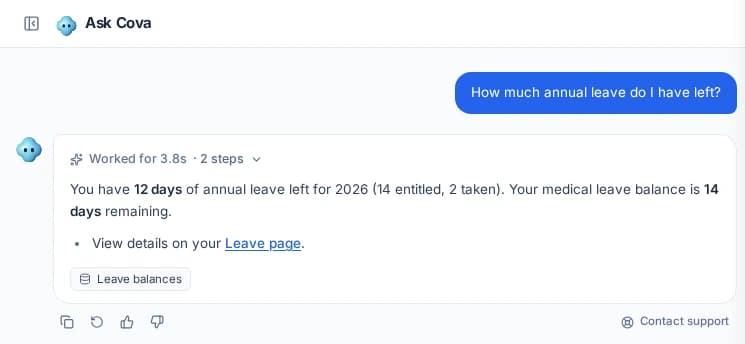
- Ask Cova. Ask Cova answers HR questions in plain English from the company handbook and documents HR adds, and only sees what the person asking can see. When we switch it on for your company, Ask Cova can also answer from your own records in Cova, such as how much leave you have left.
- Profile photo checks. Profile photos are checked automatically when they're uploaded, and inappropriate ones are blocked.
Ask Cova answers; it doesn't act. It can't apply for leave, approve or book anything for you. People still approve, decide and sign off.
Want something else handled with AI, or automated in a way that's specific to how your team works? Yes, we build and set this up for your team.
How to switch without a big project
You don't have to move everything at once.
- Start with your people. Import your staff list from Excel or CSV. You see a preview first, and nothing is created or emailed until HR reviews and submits.
- Move leave and approvals next. That's where chat-group approvals disappear first. Our annual leave guide covers the rules to set up.
- Add expiry reminders and training when you're ready. If you hire on different work passes, see onboarding checklists by pass type.
- Tell us what's left. Past records to bring over, an approval route unique to your team, or an automation you can't find? Yes, we build and set this up for your team.
What's available for your team depends on the modules you choose. Cova's app and your company data are hosted on servers in Singapore. Ask us about hosting and security.
What you stop doing
- No copying the same details into three files.
- No hunting through chat groups for an approval.
- No relying on someone opening a sheet to spot an expiry.
- No guessing who changed a record.
Frequently asked questions
When should an SME stop using spreadsheets for HR?
When the same details live in several files, approvals happen in chat groups, expiry dates are spotted late, or nobody can say who changed a record. If two or more of those sound familiar, one connected HR system will remove most of the chasing, whatever the size of your team.
What is an integrated HR system?
One system where people records, leave, approvals, work pass and certificate dates and training share the same data. You update a person once, and everything that depends on them uses the new details. The opposite is a set of spreadsheets and separate apps that each keep their own copy.
What does AI do in Cova today?
Two things your team will use. Ask Cova answers HR questions in plain English from the company handbook and documents HR adds, and only sees what the person asking can see. Profile photos are checked automatically when they're uploaded, and inappropriate ones are blocked.
Do we have to move everything at once?
No. You can start by importing staff from Excel or CSV, with a preview; nothing is created or emailed until HR reviews and submits. Then add leave and approvals, then reminders and training. Past records to bring over? Yes, we build and set this up for your team.
Can we keep a spreadsheet-style view?
Yes. Sheets are Cova's own tables: a new sheet is private until shared, and every change shows in its history. Teams that like working in a grid keep one, in the same system as their people records, leave and approvals.
How much does an integrated HR system cost?
With Cova, it depends on the modules you choose. Ask the Cova team for a quote for your headcount and the modules you need, or book a demo and we'll walk you through what your team would use.