Automate work pass and certificate expiry reminders
Work pass and certificate expiry reminders without the spreadsheet: the manual way, the gaps, and how Cova emails HR and managers before anything lapses.
By Cova
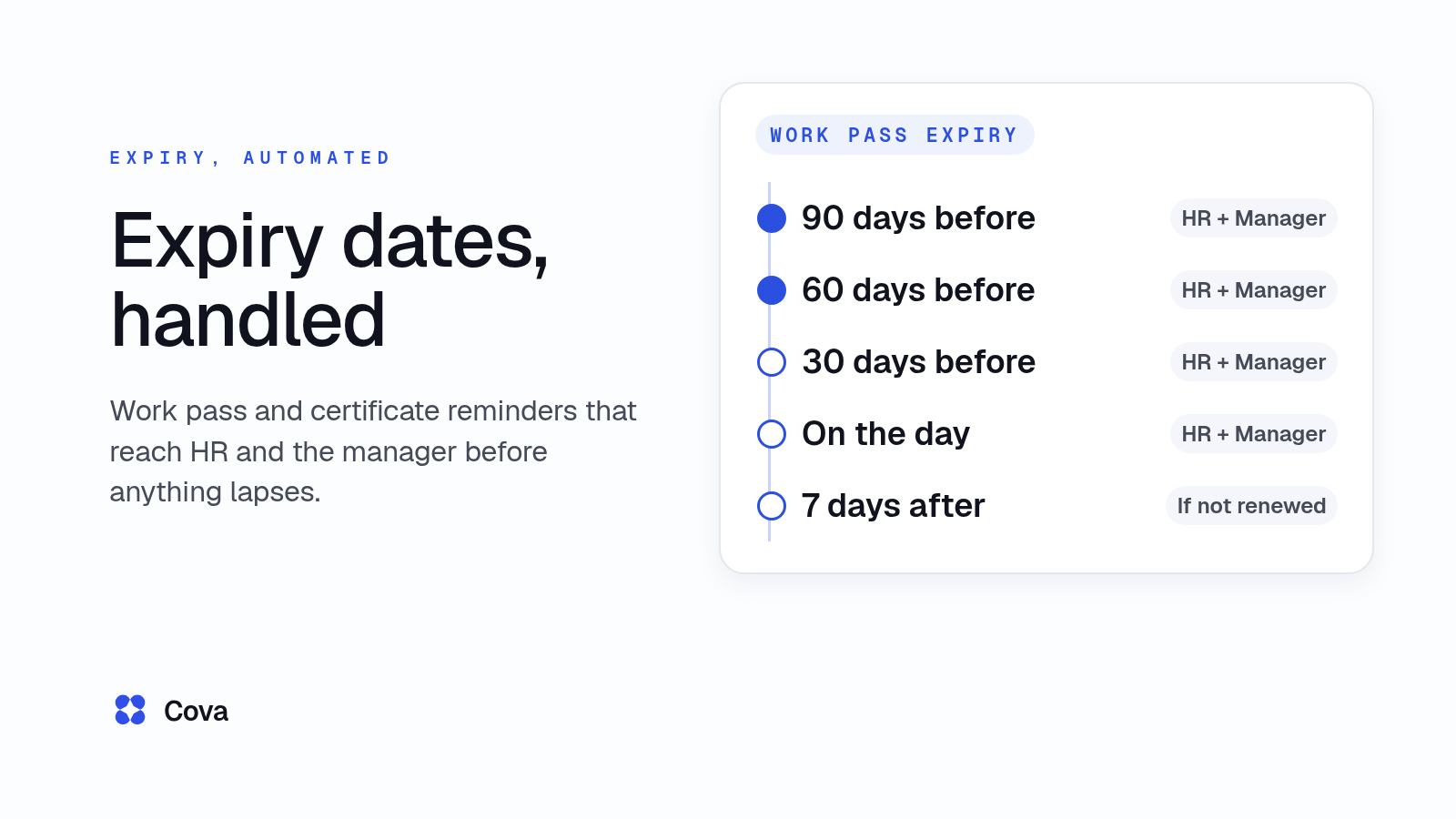
Cova emails HR and the person's direct manager 90, 60 and 30 days before a work pass or certificate expires, on the expiry date, and 7 days after. Many Singapore SMEs still track those dates in a spreadsheet and hope someone checks it in time.
This guide shows the manual way first, where it tends to break, and then how Cova's HR system sends the reminders for you. The screenshot comes from Cova's demo workspace.
Why expiry dates slip through
Work passes, passports, certificates and other documents each run on their own cycle, and they're often kept in different places. MOM's renewal windows also differ by pass:
- Employment Pass: you can apply to renew up to 6 months before the pass expires, and you must apply before the expiry date. For EP (Sponsorship) holders, renewal opens 3 months before expiry. (MOM: renew an Employment Pass)
- S Pass: the same 6-month window. (MOM: renew an S Pass)
- Work Permit: MOM says to renew 7 to 12 weeks before the permit expires, otherwise an overstaying fine will be imposed. (MOM: renew a Work Permit)
Passports matter too. MOM notes that to get a full 2-year Work Permit, the worker's passport needs to be valid for at least 25 months (MOM: renew a Work Permit), and an S Pass holder's passport must be valid for at least 7 months to renew (MOM: renew an S Pass). For the full rules on each pass, including what happens if one lapses, see our work pass expiry guide.
The manual way: an expiry spreadsheet and calendar reminders
Set up the sheet
Most teams start with one row per person per item: the name, what it is, the expiry date, who owns the renewal, and a "days left" column that subtracts today's date from the expiry date. Conditional formatting turns a row amber under 90 days and red under 30.
| Employee | Item | Expires | Days left | Owner |
|---|---|---|---|---|
| Ravi Kumar | Work Permit | 14 Jan 2027 | 83 | HR |
| Mei Ling Tan | Forklift certificate | 2 Dec 2026 | 40 | Ops manager |
| Arjun Das | Passport | 30 Nov 2026 | 38 | HR |
A made-up example. Leave pass and passport numbers out of the sheet: it gets shared more widely than you expect.
Add calendar reminders
Next, someone adds a calendar event for each expiry date, often in their own calendar, sometimes with a second event a month earlier.
Where it breaks
- A spreadsheet doesn't send anything. Conditional formatting only changes how a row looks when someone opens the file.
- One person holds it all. When they're on leave or leave the company, the reminders go with their calendar.
- The manager never hears. The person who needs to plan around a Work Permit renewal often finds out last.
- Renewals aren't typed back in. The old date stays, so the sheet keeps warning about a pass that was renewed months ago, and people learn to ignore it.
- Certificates live in another file. Safety course certificates sit in a training sheet, and passports in a third place.
- New hires get missed. A joiner's pass is never added to the sheet in the first place.
How Cova sends expiry reminders automatically
In Cova, each person's work pass, passport and document expiry dates sit on their record, and reminder emails go out on a set schedule. No one has to open a file to check.
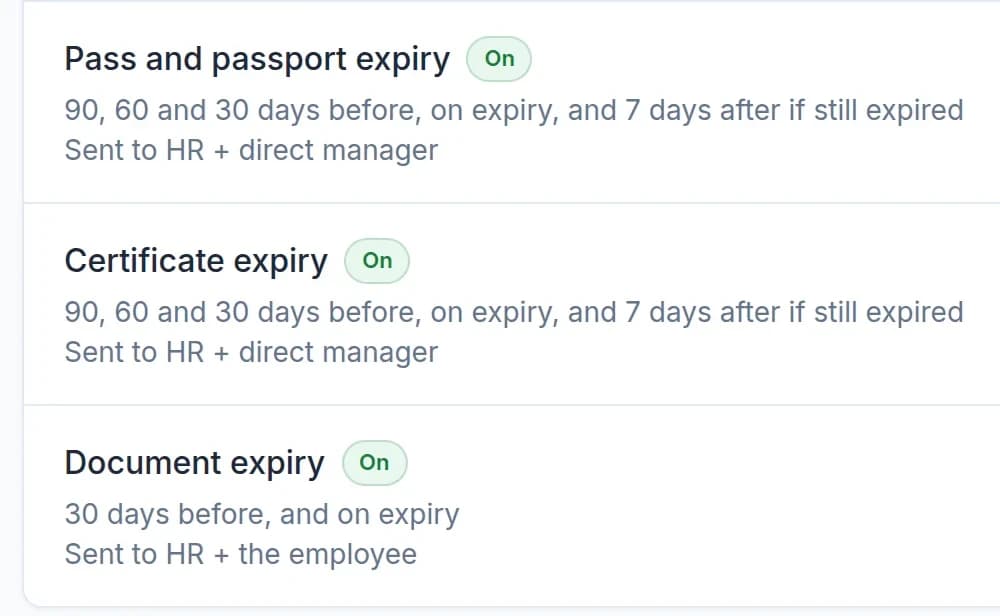
Work passes and certificates: 90, 60 and 30 days before, on the day, and 7 days after
Cova emails reminders for work passes and certificates 90, 60 and 30 days before expiry, on the expiry date, and 7 days after. They go to HR and the person's direct manager, so the manager hears about a renewal in time to plan for it. Passport reminders go to HR only.
The 7-days-after email only goes out if the item hasn't been renewed. Pass numbers are never included in any alert.
For Work Permit holders, the 90- and 60-day emails cover MOM's 7 to 12 week renewal window. The 90-day email (about 13 weeks out) arrives just before the window opens, and the 60-day email (about 8.5 weeks out) arrives inside it.
Other documents: 30 days before and on the day
Documents that expire, such as driving licences and other IDs, get reminder emails 30 days before expiry and on the expiry date. These go to HR and the employee, since the employee is often the one who renews them.
Switch each reminder on or off
HR can switch each reminder on or off. If your team doesn't need document reminders, turn that one off and leave the work pass and certificate reminders running.
See how expiry reminders fit with the rest of your people records on the Cova HRMS page.
Need different timing?
Some teams want reminders on other days, or sent to other people. Yes, we build and set this up for your team.
Keep the record current when a pass is renewed
The manual way: someone has to remember to overwrite the old date. If they don't, the sheet keeps flagging a pass that's already been renewed.
In Cova: on a person's profile, Renew replaces the old pass and stops its reminders. Nobody gets warned about a pass that's already been dealt with.
To see what's coming up across the company, the Work passes & expiry page shows what's expired or expiring within 30, 60 or 90 days. It covers passports, IDs and other documents too, not just work passes. A manager sees only their direct reports' work passes.
Start with the people you're onboarding
The easiest time to capture a pass or passport expiry date is when someone joins. Our guide to onboarding checklists by pass type shows how new joiners' passports and work passes are collected during onboarding.
What's available for your team depends on the modules you choose.
What you remove
- No expiry spreadsheet to keep in sync.
- No calendar reminders tied to one person.
- No manager finding out about a renewal at the last minute.
- No warnings for passes that were already renewed.
If you also track safety course certificates, our guide to construction training records covers that side.
HRIS buyer's checklist for Singapore SMEsWhat to check before you buy an HR system in Singapore, from leave and approvals to training records.cova.sg/resources/sg-hris-buyers-checklistFrequently asked questions
When should I renew a Work Permit in Singapore?
MOM says to renew a Work Permit 7 to 12 weeks before it expires, otherwise an overstaying fine will be imposed. In Cova, the 90- and 60-day reminder emails cover that window.
How early can I renew an Employment Pass or S Pass?
Up to 6 months before the pass expires (3 months for EP Sponsorship holders), and you must apply before the expiry date. See MOM's renewal pages for the Employment Pass and S Pass, or our work pass expiry guide for the rules for each pass.
How do I get reminded before a work pass expires?
The manual way is a spreadsheet of expiry dates plus calendar events. Cova emails HR and the direct manager 90, 60 and 30 days before a work pass expires, on the expiry date, and 7 days after if it hasn't been renewed.
Who gets the expiry reminder emails?
Work pass and certificate reminders go to HR and the person's direct manager. Passport reminders go to HR only. Reminders for other documents go to HR and the employee.
Can I turn a reminder off?
Yes. HR can switch each reminder on or off.
Can the reminders go out on different days?
Yes, we build and set this up for your team.
Can a spreadsheet send expiry reminders on its own?
Not on its own. Conditional formatting only highlights a row when someone opens the file. Sending emails needs macros, add-ins or a separate calendar or email tool, and someone to keep them running.